Read current WMS and TMS state
Search orders, purchase orders, shipments, stock, workbench objects, timelines, dependencies, receipts, reports, and operational artifacts through typed filters.
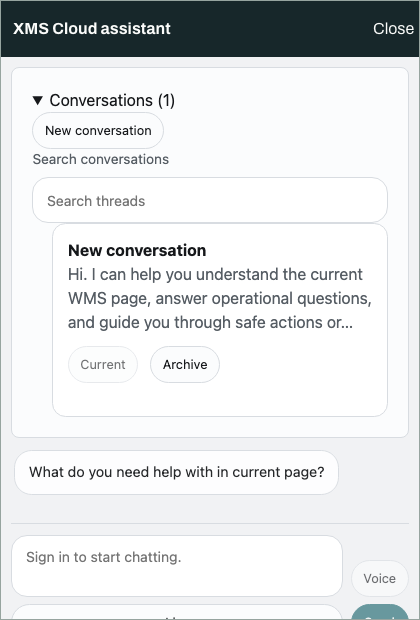
AI operations assistant
When enabled for a deployment, the assistant receives the current page, role, tenant, selected object, and conversation context. Typed XMS tools provide live operational answers and governed actions.
What it can do
Tool access follows the signed-in user's role, tenant, module, and current backend capabilities.
Search orders, purchase orders, shipments, stock, workbench objects, timelines, dependencies, receipts, reports, and operational artifacts through typed filters.
Use the active route, selected object, role, and remembered thread to explain status, ownership, blockers, safe actions, and supporting evidence.
Resolve execution strategies, compare live and shadow lanes, inspect traceability and economic impact, and read simulation, replay, decision, approval, and deviation records.
Prepare handoff drafts, approval requests, setup drafts, contest requests, task capsules, reports, and switch proposals without bypassing host review or backend authorization.
Read CSV, JSON, text, and Markdown excerpts; analyze uploaded images and PDFs; then keep document analysis separate from live backend mutations.
Use typed chat, push-to-talk transcription, full-duplex live voice, spoken replies, follow-up chips, durable threads, and cross-device conversation memory where supported.
Grounded by the current workspace
Host context carries route, role, tenant, warehouse, selected entity, workflow identifiers, and allowed host actions into the assistant. Follow-up questions reuse the last resolved object and tool evidence.
Workflow and setup copilots
Read paths are available directly. Write-looking work is staged as a governed draft or action and remains subject to policy, state, and approval.
Summarize definitions, compare strategies, inspect execution twins and shadow lanes, read simulation artifacts, and follow switchpoint readiness.
Explain effective module visibility and role experience, preview scope, diagnose manifest mismatch, and prepare setup drafts from backend-owned rules.
Resolve an object's summary, timeline, dependencies, canonical receipts, handoffs, contests, and task capsules from the current workspace.
Safety and authority
Authentication, authorization, lifecycle state, tenant scope, and final action execution remain owned by XMS Cloud and the host application.
The current user and tenant determine the available queries, drafts, and host actions.
Actions enter the ledger with review status, approval, execution result, receipt, and artifact links.
Suspicious prompts are contained before provider or tool exposure, and hostile tool results are screened before display.
The same-origin assistant gateway and provider adapter keep WMS credentials outside the browser-to-model request.
Operational boundaries
If the provider, agent route, backend capability, or host action is unavailable, the assistant reports that boundary instead of fabricating an answer or action.
The sidecar URL, provider adapter, feature flag, and eligible role must be enabled before the assistant appears.
Live operational queries and conversation history require an authenticated XMS Cloud session.
Setup drafts stay read-first, and unsupported direct activation or publish requests remain blocked.
Per-day and per-conversation token budgets, model tiering, and admin health keep provider use observable.
Use the assistant in context
The assistant inherits the current operational context so the first answer starts from the object and role already on screen.